
What you will learn
- Why zero day response is an inventory problem first
- The first hour: confirming what is actually affected
- How to query exposure instead of guessing
- A triage decision that survives executive scrutiny
- Mitigation options when patching is not available yet
- How to validate that mitigation works
- What to review after the event
Explanation
Zero day response is decided before the advisory lands
Organisations that respond well to a zero day are not faster readers of security news. They already know what they run, where it is reachable from, who owns it and how to change it. That is exactly what the scoping and discovery stages of CTEM produce. If your first action after an advisory is to email teams asking whether they use the affected product, the response is already days behind.
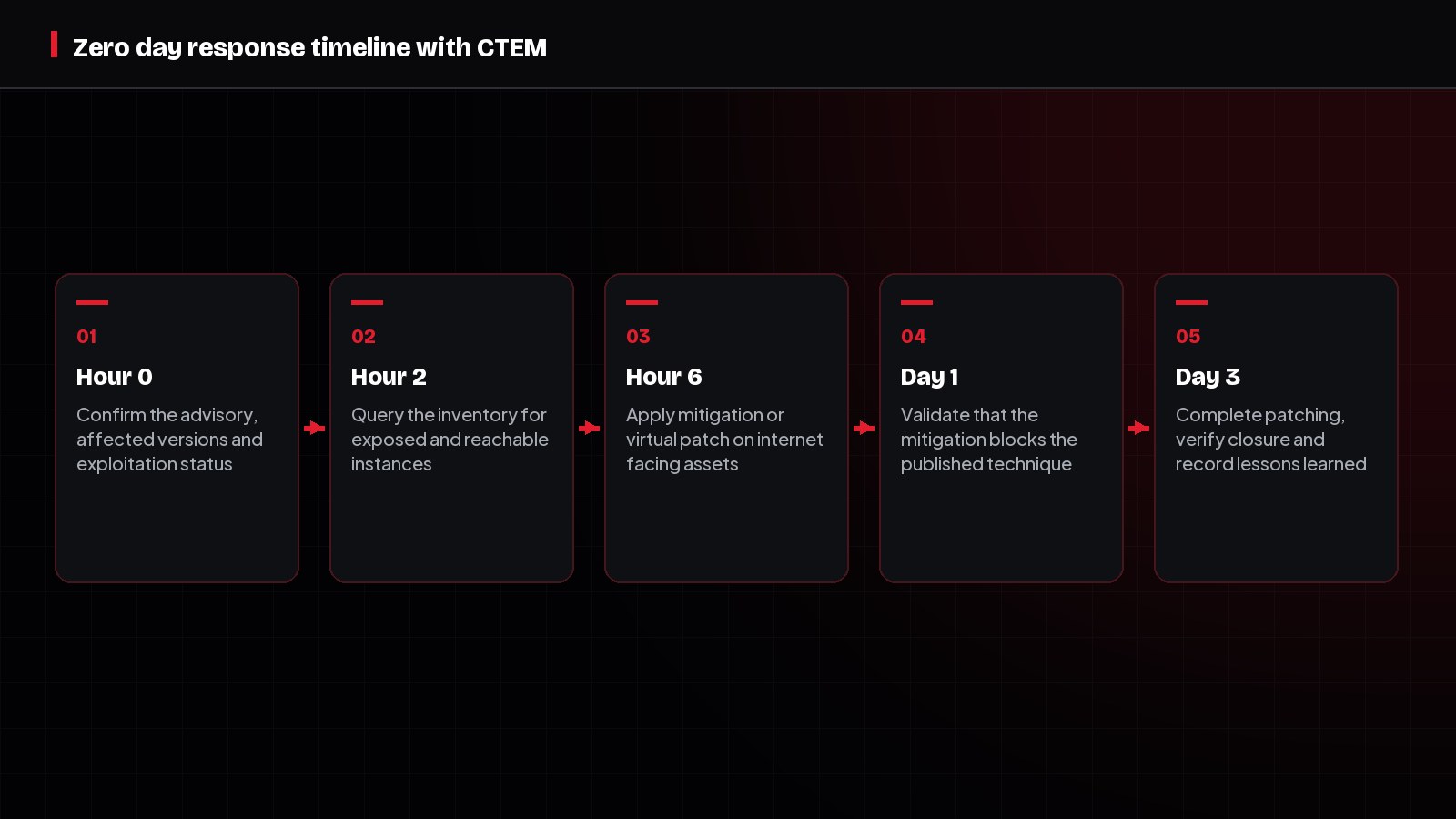
Hour zero: confirm before you mobilise
Early advisories are frequently wrong about scope, affected versions and exploitability. Establish the facts before you wake up engineering teams, and record what you know and what you do not. A response built on an inaccurate version range wastes the credibility you need for the next event.
- Which exact product versions and configurations are affected, and which are not
- Whether exploitation has been confirmed in the wild or is only theoretical
- Whether a patch, a vendor mitigation or neither is available right now
- Which preconditions the exploit needs, such as an exposed listener or a specific feature enabled
- What indicators exist so detection engineering can start immediately
Hour two: query, do not survey
Ask the inventory, not the organisation. A CTEM programme should be able to answer, within minutes, which assets run the affected component, which of those are reachable from untrusted networks, and which support crown jewel business services. If that query takes days, the finding of this incident is an inventory gap, and it deserves a place on the remediation backlog itself.
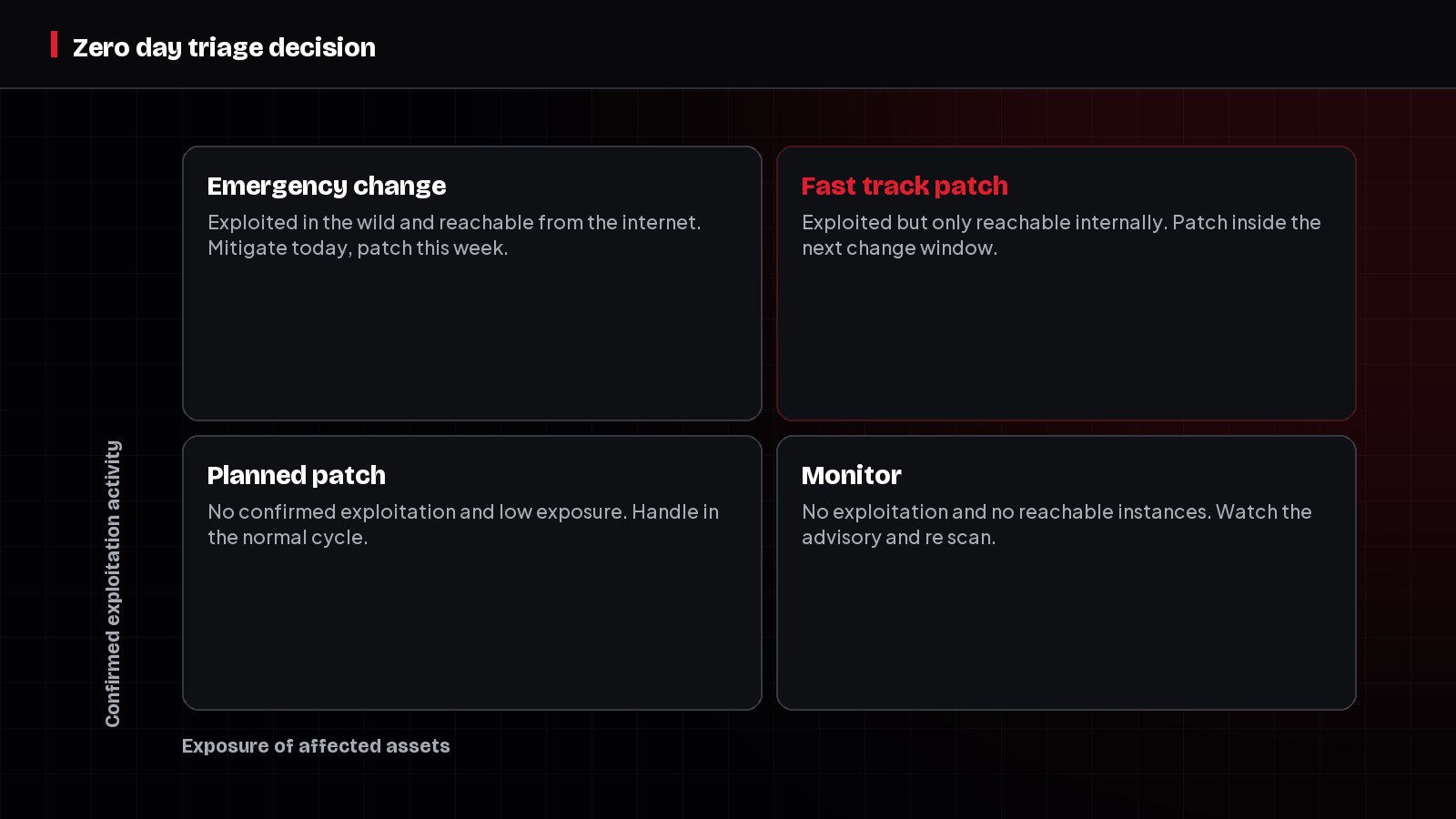
Triage using exposure and exploitation together
Not every instance deserves an emergency change. Emergency changes carry their own operational risk, and using them indiscriminately burns the goodwill you need when it genuinely matters. Combine confirmed exploitation activity with real reachability to decide who acts today and who waits for the normal cycle.
Mitigate first when patching is not possible
Frequently the patch does not exist yet, or the change window is days away. Mitigation buys time, and in a CTEM programme it is a legitimate outcome rather than a failure, as long as it is recorded, validated and given an expiry date.
- 1Remove reachability: take the service off the internet or restrict source ranges to known networks.
- 2Disable the vulnerable feature or module where the business can tolerate it.
- 3Apply a virtual patch at the web application firewall or reverse proxy.
- 4Rotate credentials and secrets the affected system could have exposed.
- 5Deploy a high confidence detection rule for the published technique and route the alert.
Validate the mitigation, do not assume it
A firewall rule that was deployed is not the same as a technique that is blocked. Emulate the published technique against a representative instance and confirm the mitigation holds and that your monitoring produced an alert. This is the same validation discipline CTEM uses routinely, applied under time pressure, and it converts a hopeful status update into evidence.
Verify closure and capture the lesson
Close the event only when patched instances have been retested and temporary mitigations have either been removed or converted into permanent controls with owners. Then run a short review focused on the mechanics rather than blame: how long the inventory query took, how many assets were discovered during the event that were not previously known, and how long the change approval actually took.
| Review question | Good outcome | Signal to fix |
|---|---|---|
| Time to identify affected assets | Under two hours from a query | Days spent surveying teams by email |
| Assets discovered during the event | None that were previously unknown | New systems appearing mid response |
| Time to first mitigation | Same day for internet facing assets | Blocked waiting for a scheduled change window |
| Mitigation validated | Technique tested and blocked | Rule deployed but never tested |
| Closure verified | Retest evidence for every asset | Closed on a ticket status alone |
How to apply this
- Write the zero day runbook now, while nothing is on fire.
- Test the inventory query quarterly using a fictional advisory.
- Pre approve an emergency change path for internet facing mitigation.
- Keep a validated virtual patching capability ready for web facing services.
- Require retest evidence before any zero day ticket is closed.
Common mistakes
- Emailing teams to ask what they run instead of querying an inventory.
- Declaring an emergency for every advisory, which devalues real ones.
- Deploying a mitigation and never testing whether it blocks the technique.
- Leaving temporary mitigations in place with no owner and no expiry.
- Skipping the review, so the same inventory gap causes the same delay next time.
Frequently asked questions
Related pages
CTEM Prioritization Signals
CTEM Prioritization: KEV, EPSS, CVSS, Business Impact
How to combine CVSS, CISA KEV, EPSS, reachability and business impact into a CTEM prioritization model your engineering teams will actually accept.
Compensating Controls in CTEM
Compensating Controls in CTEM: When You Cannot Patch
How to use compensating controls in CTEM: five options when patching is impossible, validating that a control blocks the technique, and writing a defensible exception.
CTEM Mobilization Stage
The CTEM Mobilization Stage Explained
The CTEM mobilization stage explained: ownership, work routing, risk based SLAs, exceptions, verification and the metrics that prove exposures really closed.
Earn your free CTEM certification.
Ready to prove your CTEM knowledge? Start with the free LearnCTEM Beginner Certification, continue with the Practitioner Certification, and build toward Program Leader. Every LearnCTEM certificate is free, vendor-neutral, and publicly verifiable at LearnCTEM.com.
Beginner / Practitioner / Program Leader
Explore certificationsAuthor
LearnCTEM Editorial Team
Practitioners and educators writing plain-English guides on Continuous Threat Exposure Management.
Reviewed by
Senior CTEM Practitioner Panel
Reviewed for accuracy against public CTEM guidance and real-world program experience.